Your suppliers send their invoices to your FactuLector address, or you forward them yourself, and every day you get an Excel file with all the data, VAT broken down and errors already flagged. Any format: PDF, phone photo, scan or even handwritten.
Try it free with 5 documents How it works
No card · Nothing to install · Get the result by email in a few minutes
| Date | Supplier | Net | Total | Check |
|---|---|---|---|---|
| 03/03/2026 | Empresa Ejemplo S.L. | 2.300,00 | 2.783,00 | OK |
| 09/03/2026 | La Tagliatella | 46,64 | 51,30 | OK |
| ··/06/2026 | Mercadona, S.A. | 33,46 | 40,17 | Unclear |
| 19/08/2026 | Tuft Retail | 115,70 | 145,00 | Modified |
Example: in orange, what can't be read clearly; in red, an invoice re-sent with a different amount.
You don't change the way you work. Just one email address.
For example, invoices-yourcompany@…. Give it to your suppliers or forward what you receive. You can also send photos of receipts from your phone.
Invoices, receipts, credit notes, summary invoices… from any supplier, with no templates or setup. Even a crooked photo, a scan or a handwritten one.
A single Excel file with the whole month, with every line item and VAT broken down. Every day at the time you choose, with everything received up to 30 minutes earlier. Ready for your bookkeeping or your accountant.
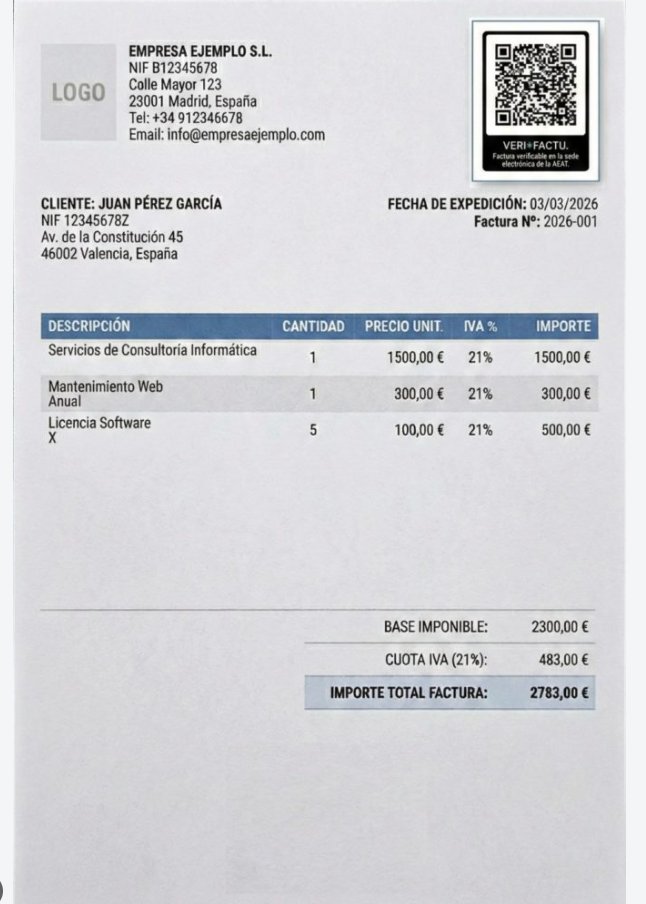
A photographed invoice
| Field | Read |
|---|---|
| Supplier / Tax ID | EMPRESA EJEMPLO S.L. · B12345678 |
| Invoice no. / date | 2026-001 · 03/03/2026 |
| Buyer / Tax ID | Juan Pérez García · 12345678Z |
| Net / VAT 21 % / Total | 2.300,00 · 483,00 · 2.783,00 |
| Line items | Consulting 1,500 · Web maintenance 300 · Licences 5 × 100 |
| Sum of lines = net | Matches |
| VAT deductible? | Yes |
| Field | Read |
|---|---|
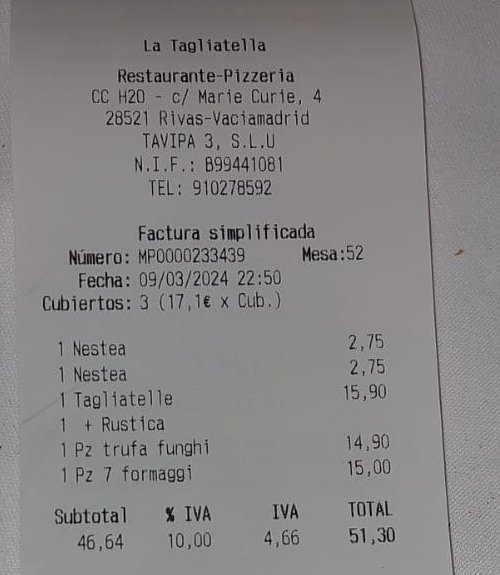
| Type | Receipt (simplified invoice) |
| Supplier / Tax ID | La Tagliatella (TAVIPA 3, S.L.U) · B99441081 |
| No. / date | MP0000233439 · 09/03/2024 |
| Net / VAT 10 % / Total | 46.64 · 4.66 · 51.30 |
| Line items | 2 × Nestea · Tagliatelle + Rústica · Truffle funghi pizza · 7 formaggi pizza |
| Sum of lines = total | Matches |
| VAT deductible? | No: your Tax ID is not on it |
So you know which receipts you can deduct and which ones to swap for a full invoice.
| Field | Read |
|---|---|
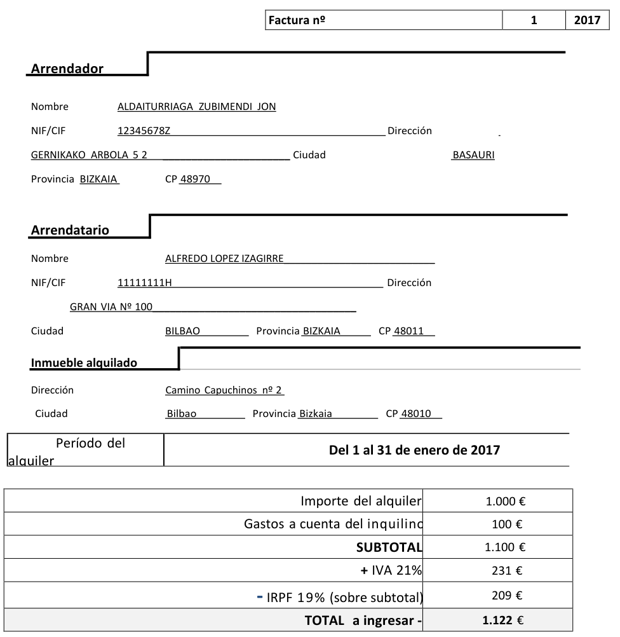
| Type | Invoice (PDF) |
| Supplier / Tax ID | Aldaiturriaga Zubimendi, Jon · 12345678Z |
| Invoice no. | 1/2017 |
| Date | No issue date: it only states the period (January 2017). Flagged for review; never made up |
| Net / VAT 21 % / Total | 1.100,00 · 231,00 · 1.122,00 |
| Income tax withheld (IRPF) | 209,00, in its own column |
| Line items | January rent 1,000 · Recharged expenses 100 |
| Sum of lines = net | Matches |
And almost anything that lands in your inbox: scans, credit notes, multi-page invoices, crooked photos or handwritten notes. If it has an amount, it ends up in your Excel.
What takes an office worker hours to check, highlighted in colour in your Excel.
Several VAT rates on the same invoice, equivalence surcharge and income tax withholdings (IRPF), each in its own column.
Products, shipping and discounts, and a check that they add up to the net amount. If they don't, you're warned.
If something can't be read clearly (a blurry photo, a covered number), the cell turns orange with the reason. It never fills in what isn't there.
If the same invoice is sent twice, even as a different file, it isn't counted twice. It checks against all previous months.
If a supplier re-sends the same invoice with a different amount or date, it's flagged in red and tells you exactly what changed.
Invoices, corrective invoices (credit notes), summary invoices, receipts, delivery notes, pro formas and quotes, each one identified. If it isn't a valid invoice or lacks your tax ID, you're warned that the VAT can't be deducted.
You can do that with the odd invoice. But to keep a month's books, this is what changes:
| With an AI chat | With FactuLector |
|---|---|
| You upload invoices by hand, one conversation at a time | Automatic: they arrive by email and the Excel updates itself every day |
| The table comes out different in every conversation | Always the same columns, ready for your bookkeeping |
| It doesn't remember what you uploaded last month | Builds up the month and compares with your whole history |
| It doesn't know if you already uploaded an invoice | Detects duplicates and invoices re-sent with changes |
| If it can't read a number, it may make it up without telling you | Flags what's unclear and explains why; never fills in what isn't there |
| It doesn't check that the numbers add up | Checks lines, net, VAT and total, and warns you if something's off |
| It can't tell a pro forma from an invoice | Warns you about pro formas, quotes and receipts without tax ID (non-deductible VAT) |
| File limits per conversation | Hundreds of documents a month, even photos with several receipts |
| Your invoices sit in a personal chat account | EU server, data protection agreement and deletion when you leave |
| You need to know what to ask and check what it returns | You don't have to do anything: just open the Excel |
No lock-in. Monthly prices, VAT not included.
Freelancers and small businesses
SMEs
Accounting firms and high-volume companies
No surprise charges: we let you know at 80% and 100% of your plan, and you can upgrade in one click if you need to. A PDF longer than 3 pages counts as one document per 3 pages. Pay by card, no commitment: change plan or cancel anytime. The Excel columns are in Spanish, following Spanish accounting.
Upload up to 5 documents and we'll email you the Excel in a few minutes.
When you subscribe we give you your FactuLector address. It only receives: the Excel file arrives in your usual inbox. Pick whichever way suits you, or combine them.
Ask them to send their invoices to your FactuLector address, or to copy it (CC) if you still want to receive them yourself. Usually it's just a matter of changing the billing email on your customer record or in their customer area.
Your suppliers keep writing to you, without changing anything, and your email automatically forwards to us whatever arrives from them.
Forward any email with invoices or send photos of receipts from your phone. You can send several documents in the same email.
About 2 minutes, just once. You can include all your suppliers in the same rule.
Several suppliers at once: enter them in "From" separated by OR.
In some companies using Microsoft 365, the administrator blocks forwarding to external addresses. In that case, use option 1 or 3.
No. You get an Excel file with fixed columns that you can review, filter or import into your software, or pass on to your accountant.
Invoices, receipts, simplified invoices, credit notes, summary invoices, delivery notes, pro formas and quotes. As PDF, photo, scan or Excel. Handwritten too, if the handwriting is legible.
Every value that can't be read with certainty turns orange with the reason, and the Excel checks that the lines add up to the net amount. So you know exactly what to check, instead of checking everything.
On a server in the European Union. We sign a data processing agreement (GDPR) with you and delete your data when you leave the service.
No. You pay month by month and can cancel whenever you want.
The website and emails are available in English. The Excel columns are in Spanish, because they follow Spanish invoicing and tax rules (VAT, IRPF, equivalence surcharge).